如何用reStructuredText撰写文档
注意
有块性质的标记,上下都要有空行。
章节划分
- # 为文章大标题
- * 为章节
- = 为小节
- - 为子小节
- ^ 为子子小节
- “ 为段落
字体标注
加强
定义在docutils里。符号与被装饰的字体之间不能有空格、不能嵌套。转义字符是, 装饰过的字体看做一个整体, 在句子中,它前后应以空格分隔
- emphasis 斜体italics特殊加强
- strong 粗体加强
def function():表示是代码
以下是rst标准用法:
- rst emphasis
- strong contents
literal contents- subscript contents
- superscript contents
- title-reference contents
名词解释
- 名词A
解释在这。注意这里前面的空白都被自动缩进。
这个是该解释的第二段。
- name a
- what is name a.
- apple
- orange
- both of them are friute
署名
| Authors: | Larry |
|---|---|
| Version: | 1.0 |
样式
命令行
| -a | command option a is for ... |
| -f | specify the file name |
| --help | print help message |
| /p | Dos like options |
换行
这句
话的格式
如同源文件
注释
下面是注释,将不显示出来
显示标记
显示标记以”.. “开始,标记词常见有attention, caution, danger, error, hint, important, note, tip, warning, admonition, image, figure。使用时注意上方空一行。
sphinx自定义了一套标记有:
toctree 目录,列表项用self表示自己,可以生成sitemap。相应的option有
- maxdepth 显示树的深度
- numbered 标注数字
- caption  目录的名字
- name 用于生成ref可用的引用词
- titlesonly  只显示文章标题
- glob      使列表文章支持通配符,如intro*
- reversed  倒序排列,通常在用glob时用到
- hidden    不常用
- includehidden  不常用
- note 注解。用以产生一个新的段落,用以说明。
- warning
- versionadded
- versionchanged
- deprecated
- seealso
- rubric
- centered 居中粗体
- hlist
特殊名称
- sphinx固定使用一些特殊名称,不要用这些名称命名文件::
- genindex
- modindex
- search
- 所有以下划线开头的文件名 _filename
画图
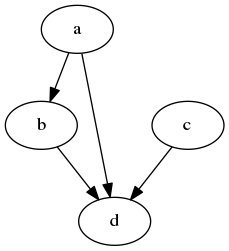
使用graphviz画图如下:
.. graphviz::

    digraph abc{
        a;
        b;
        c;
        d;

        a -> b;
        a -> d;
        b -> d;
        c -> d;
    }
注意命令词下方一行是其参数,如果没有参数,需把这行空出来。图示如下
更复杂一点的如下:
![digraph a{
size = "4,4";
main [shape=box]; /* comment */
main -> parse [weight=8];
parse -> execute;
main -> init [style=dotted];
main -> cleanup;
execute -> {make_string; printf}
init -> make_string;
edge [color=red]; // 以下线条变为红色
main -> printf [style=bold, label="100 times"];
make_string [label="make a\nstring"];
node [shape=box,style=filled,color=".7 .3 1.0"];
execute -> compare;
}](_images/graphviz-09c4f652145e279b374734d39518f63ea3168db3.png)
struct的:
![digraph structs {
node [shape=record];
struct1 [shape=record,label="<f0> left|<f1> mid\ dle|<f2> right"];
struct2 [shape=record,label="<f0> one|<f1> two"];
struct3 [shape=record,label="hello\nworld |{ b |{c|<here> d|e}| f}| g | h"];
struct1 -> struct2;
struct1 -> struct3;
}](_images/graphviz-b11203fd4d9bb2e041267b346cad0d9873233523.png)
类html格式sphinx无法支持:
![digraph htmla {
abc [shape=none, margin=0, label=<
<TABLE BORDER="0" CELLBORDER="1" CELLSPACING="0" CELLPADDING="4">
<TR><TD ROWSPAN="3"><FONT COLOR="red">hello</FONT><BR/>world</TD>
<TD COLSPAN="3">b</TD>
<TD ROWSPAN="3" BGCOLOR="lightgrey">g</TD>
<TD ROWSPAN="3">h</TD>
</TR>
<TR><TD>c</TD>
<TD PORT="here">d</TD>
<TD>e</TD>
</TR>
<TR><TD COLSPAN="3">f</TD>
</TR>
</TABLE>>];
}](_images/graphviz-548742ef46abe3038e0289cc3944f263bf3c9cd0.png)
拥有子图:
![digraph G {
subgraph cluster0 {
node [style=filled,color=white];
style=filled;
color=lightgrey;
a0 -> a1 -> a2 -> a3;
label = "process #1";
}
subgraph cluster1 {
node [style=filled];
b0 -> b1 -> b2 -> b3;
label = "process #2";
color=blue
}
start -> a0;
start -> b0;
a1 -> b3;
b2 -> a3;
a3 -> a0;
a3 -> end;
b3 -> end;
start [shape=Mdiamond];
end [shape=Msquare];
}](_images/graphviz-9acc41a0c8819ec0d4b253c735a415190cfb66b1.png)